Relationship model
A relationship represents a link between two entities in the Tracker-model. A relationship is considered data in DHIS2 and is based on a Relationship Type, similar to how a Tracked Entity is based on a Tracked Entity Type.
Relationships always connect two entities, and these entities can include Tracked Entities, Enrollments and Events, and any combination of these. Note that all of these combinations are not currently available through the User Interface.
Relationships between entities can be classified as either unidirectional or bidirectional, with each type requiring different levels of access for creation.
- Unidirectional relationships require the user to have:
- Write access to the "from" entity
- Read access to the "to" entity
- Bidirectional relationships require write access to both the "from" and "to" entities.
When retrieving relationships from a tracker exporter endpoint, only those originating from the requested entity are shown. This means that the entity is either part of a bidirectional relationship or the "from" entity in a unidirectional relationship.
Relationship Type
A Relationship Type is the definition of the properties a relationship have. Relationships always consists of two sides, referred to as "from" and "to", and what entities can be contained for each side is determined by the Relationship Type. The properties that determine what each can contain are called constraints, fromConstraint and toConstraint respectively. These constraints are significant when working with the data later, to understand what a relationship can and cannot contain.
Each of the constraints defined in the Relationship Type consists of several properties. The primary property is the relationship entity, which decides what kind of entities the relationship can contain. The entities can be one of the following for each constraint:
- Tracked Entity
- Enrollment
- Event
Depending on the kind of relationship entity you select, you can choose additional limitations for each constraint. The following table explains the different combinations you can configure:
| Tracked Entity Instance | Enrollment | Event | |
|---|---|---|---|
| Tracked Entity Type | Required | Optional | - |
| Program | - | Required | - |
| Program Stage | - | Required | Optional |
These additional limitations, will require the entity to match the limitation set before it can be created. For example, if your relationship is between a mother and a child, both constraints would have their required Tracked Entity Type set to Person and could optionally set the Enrollment to Maternal Health Program and Child Program respectively. This way, only Tracked Entities who are of type Person and who is enrolled in the required program is allowed to be included in these relationships.
In addition to the constraints defined by a Relationship Type, each relationship can be configured as bidirectional, true or false.
- If the property is set to false, the relationship is unidirectional.
- If set to true, the relationship is bidirectional. As mentioned earlier in here, this setting impacts the required access levels for creating the relationship, and the relationships displayed when exporting an entity that is part of the relationship.
One important thing to note about bidirectional relationships, are that the "from" and "to" sides are still significant in the database, meaning each entity must match the constraint for that side. However, from a user perspective, which side each entity is stored as is insignificant.
Example
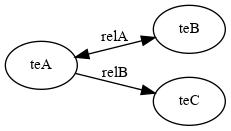
- Bidirectional relationship relA connects teA to teB and connects teB to teA.
- Unidirectional relationship relB connects teA to teC but DOES NOT connect teC to teA.
- teA originates relationships relA and relB.
- teB originates relationships relA.
- teC originates no relationships.
- relA originates from teA and from teB, and points to teA and to teB.
- relB originates from teA and points to teC.